Mailchimp Email Template: No HTML Needed
Every time you hit "send" on a marketing email, you're making a statement about your business. For online stores, boutiques, and service providers, that email is often the first real touchpoint with a customer. It needs to look polished, feel professional, and unmistakably represent your brand. Yet so many business owners either settle for bland, generic layouts or spend hours wrestling with code they barely understand. There's a better way to handle email design—one that puts creative control back in your hands without requiring a single line of HTML.
Why Drag-and-Drop Email Builders Changed Everything
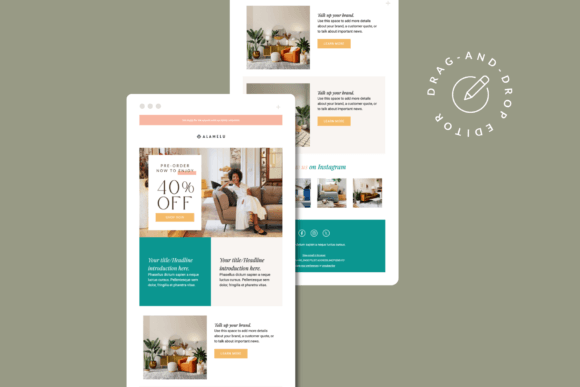
The Mailchimp Drag & Drop Email Template Builder represents a fundamental shift in how small businesses approach email marketing. Instead of outsourcing every campaign to a developer or settling for cookie-cutter designs, you can build visually compelling emails that genuinely reflect your brand's personality. The interface works intuitively: select a content block, drag it into position, customize the details, and move on. Colors, fonts, images, spacing—every element responds to simple clicks and adjustments.
What makes this approach particularly valuable for e-commerce stores and creative businesses is the speed of iteration. Launching a seasonal sale? Swap out the hero banner in minutes. Promoting a new product line? Rearrange the layout to spotlight fresh arrivals. The template structure gives you a reliable foundation while leaving room for the kind of creative flexibility that keeps your email marketing feeling fresh and intentional.
Building a Brand Identity That Travels Across Every Inbox
Consistency is the backbone of brand recognition. When a customer opens your email and immediately recognizes your aesthetic—the specific shade of sage green, the elegant serif typeface, the way your product photography is styled—that moment of familiarity builds trust. A well-structured Mailchimp newsletter template makes this consistency achievable without professional design support on every single send.
Consider a furniture shop that uses warm, earthy tones and clean sans serif typography across its website and social media. With a customizable email template, those same visual elements carry directly into the inbox. The hero banner matches the brand's Instagram aesthetic. The product grid echoes the layout of the online store. The call-to-action buttons use the exact hex codes from the brand guidelines. This kind of visual coherence across platforms—from packaging design to web design to social media graphics—signals professionalism and attention to detail.
The included Canva Design Link for hero banners is a thoughtful addition here. Even with the free version of Canva, you can create custom header images that align perfectly with your brand's visual language. Upload your own photography, apply your brand's color palette, and export a banner that slots seamlessly into your email layout. It's a practical bridge between your broader design assets and your email campaigns.
Practical Applications Beyond the Newsletter
Email templates serve more purposes than most business owners realize. Beyond weekly newsletters, a versatile Mailchimp template adapts to a wide range of communication needs:
- Product launches: Showcase new arrivals with large imagery, compelling descriptions, and direct purchase links.
- Event invitations: Boutiques hosting trunk shows or workshops can send beautifully formatted invitations that feel personal rather than automated.
- Customer appreciation: Thank-you emails, loyalty rewards, and exclusive early-access offers all benefit from polished presentation.
- Seasonal campaigns: Holiday sales, back-to-school promotions, and summer collections each deserve a layout that matches the mood.
- Editorial content: Bloggers and content creators can share curated roundups, behind-the-scenes stories, or styled lookbooks directly in the inbox.
Each of these use cases demands a slightly different visual approach, and the drag-and-drop editor accommodates that variety without requiring separate templates for every scenario. Rearrange blocks, swap images, adjust copy, and you have a completely different email built on the same reliable framework.
Typography and Readability: The Details That Matter
One often-overlooked advantage of a thoughtfully designed email template is how it handles typography. The fallback font system included in these templates addresses a real-world problem: not every email client supports custom or Google fonts. Outlook, for instance, has its own limitations. A smart template accounts for this by providing fallback options that maintain readability and visual appeal across platforms.
For brand identity purposes, this matters more than most people realize. If your website uses a specific modern typeface but your emails default to something generic because of client limitations, the experience feels disjointed. Templates that include carefully chosen fallback fonts bridge that gap, ensuring your emails look intentional whether they're opened in Gmail, Apple Mail, or Outlook.
When customizing your template, pay attention to font size, line spacing, and contrast. Body copy should be comfortable to read on mobile devices—where most email opens happen now. Headlines need enough visual weight to establish hierarchy without overwhelming the layout. These are small decisions that compound into a significantly better reading experience for your audience.
Getting Started Without the Overwhelm
The one-click installation link removes the biggest friction point for most business owners. There's no file uploading, no technical configuration, no troubleshooting compatibility issues. Click the link, and the template appears in your Mailchimp account, ready to customize. The included HTML template offers additional flexibility for those who want to use the design outside of Mailchimp—perhaps on a different email platform or embedded in a landing page.
A basic understanding of Mailchimp's drag-and-drop editor is helpful, though the learning curve is genuinely short. Spend thirty minutes experimenting with the content blocks, and you'll have a solid grasp of how to build and modify emails. The real creative work happens in the choices you make: which images to feature, how to structure your message, what calls to action will resonate with your specific audience.
For small business owners juggling inventory management, customer service, and social media, having an email marketing system that doesn't demand technical expertise is genuinely liberating. It means you can maintain a consistent email presence—weekly or biweekly campaigns that keep your audience engaged—without it consuming an entire afternoon each time.
The Bigger Picture: Professional Presentation as a Growth Strategy
There's a direct connection between how professional your communications look and how customers perceive the value of your products. A boutique sending beautifully designed emails with cohesive branding signals the same care and attention to detail that presumably goes into curating their collection. A furniture store with polished, well-organized email layouts suggests the same thoughtfulness applied to their product selection and customer experience.
This isn't about vanity metrics. Open rates, click-through rates, and ultimately conversions all respond to presentation quality. An email that's easy to scan, visually engaging, and clearly organized guides the reader toward action—whether that's browsing a new collection, redeeming a discount code, or reading a blog post. The template provides the structure; your content and creative choices provide the substance.
Investing in tools that elevate your email marketing without adding complexity to your workflow is one of the smartest moves a growing business can make. The combination of a customizable Mailchimp template, editable Canva banners, and an HTML fallback gives you a complete system for professional email communication—one that scales with your business and adapts to whatever campaign you're running next.